
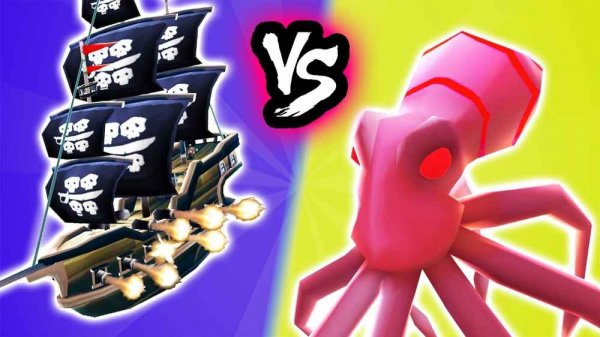
Caribbean Merge Puzzle Adventure
Reviews
Caribbean Merge Puzzle Adventure offers a satisfying blend of puzzle-solving and strategic planning. The merge mechanics are intuitive, and the tactical battles against the Kraken add excitement. The family-friendly design and colorful graphics make it accessible for all ages, while the increasing difficulty keeps experienced players engaged. A great choice for casual gaming sessions.
About this game
Game Introduction
Caribbean Merge Puzzle Adventure is a family-friendly puzzle and strategy game set in a bright, colorful Caribbean world. The core objective is to merge identical ships to unlock more powerful vessels, then deploy them tactically against opponents such as the mighty Kraken. This game combines the satisfying logic of merging puzzles with the depth of strategic planning, offering an engaging experience for players of all ages. The cheerful graphics and pirate theme create an immersive environment without any inappropriate content. Each level presents a new challenge, requiring careful planning to overcome. The game is designed to be accessible and fun for everyone, from casual players to those who enjoy deeper strategy.
How to Play
Players typically use simple drag-and-drop controls to move ships on the screen. To merge, drag one identical ship onto another, which combines them into a single, stronger ship. After merging, you strategically place your ships on a battlefield to face various adversaries. Each level presents a new puzzle, requiring careful planning to overcome challenges. The game is easy to learn but offers increasing difficulty, and it works directly in a web browser on both desktop and mobile devices without any downloads. The controls are intuitive, making it simple for new players to start playing right away.
Game Features
Key features include merging ships to increase their power and unlock new abilities. Players face off against the Kraken and other opponents in tactical battles. The game offers a mix of puzzle-solving and strategic decision-making. It is fully family-friendly with no inappropriate content, making it suitable for all ages. The colorful Caribbean-themed graphics and accessible browser-based play provide hours of entertainment without the need for installation. The game may include various ship types that players can discover and combine to create more effective strategies.
Tips for Success
To succeed, focus on planning your merges carefully—merging too early may leave you without enough ships for certain challenges. Observe enemy patterns and place your strongest ships where they can have the most impact. Practice regularly to improve your strategic thinking and learn the strengths of different ship types. Take your time with each puzzle, as rushing can lead to mistakes. Finally, enjoy the process and experiment with different strategies to find what works best for you.






Comments
Sign in to leave a review
No account? Create one
No comments yet.